
How to Claim GST Refunds: Process & Eligibility Guide (2025)
By Filing Buddy . 24 Dec 25


How to Claim GST Refunds: Process and Eligibility – A Complete Guide
Let’s face it: The only thing harder than earning money is watching it sit in an electronic ledger where you can’t touch it. If your working capital is currently playing "hide and seek" in the form of excess tax payments, you know the pain.
But here’s the good news: getting that money back doesn't have to feel like pulling teeth.
In simple terms, a GST refund is just the process of asking the government to return the excess tax you’ve paid. Think of it as a "return to sender" for your cash. Whether you’re an exporter or you’ve accumulated too much credit because your input taxes are higher than your output taxes, that money belongs to you, not the portal.
In this guide, we break down how to claim GST refunds without losing your mind. We’ll cover the eligibility, the must-have documents, and the exact step-by-step process to get your liquidity back where it belongs i.e. in your bank account.
Am I Eligible? Who Can Claim a GST Refund?
Think of the GST refund process as an exclusive club not everyone gets in. You can’t just ask for your money back because you had a slow month. The government has a specific guest list for this party.
Here is who actually qualifies to claim a GST refund:
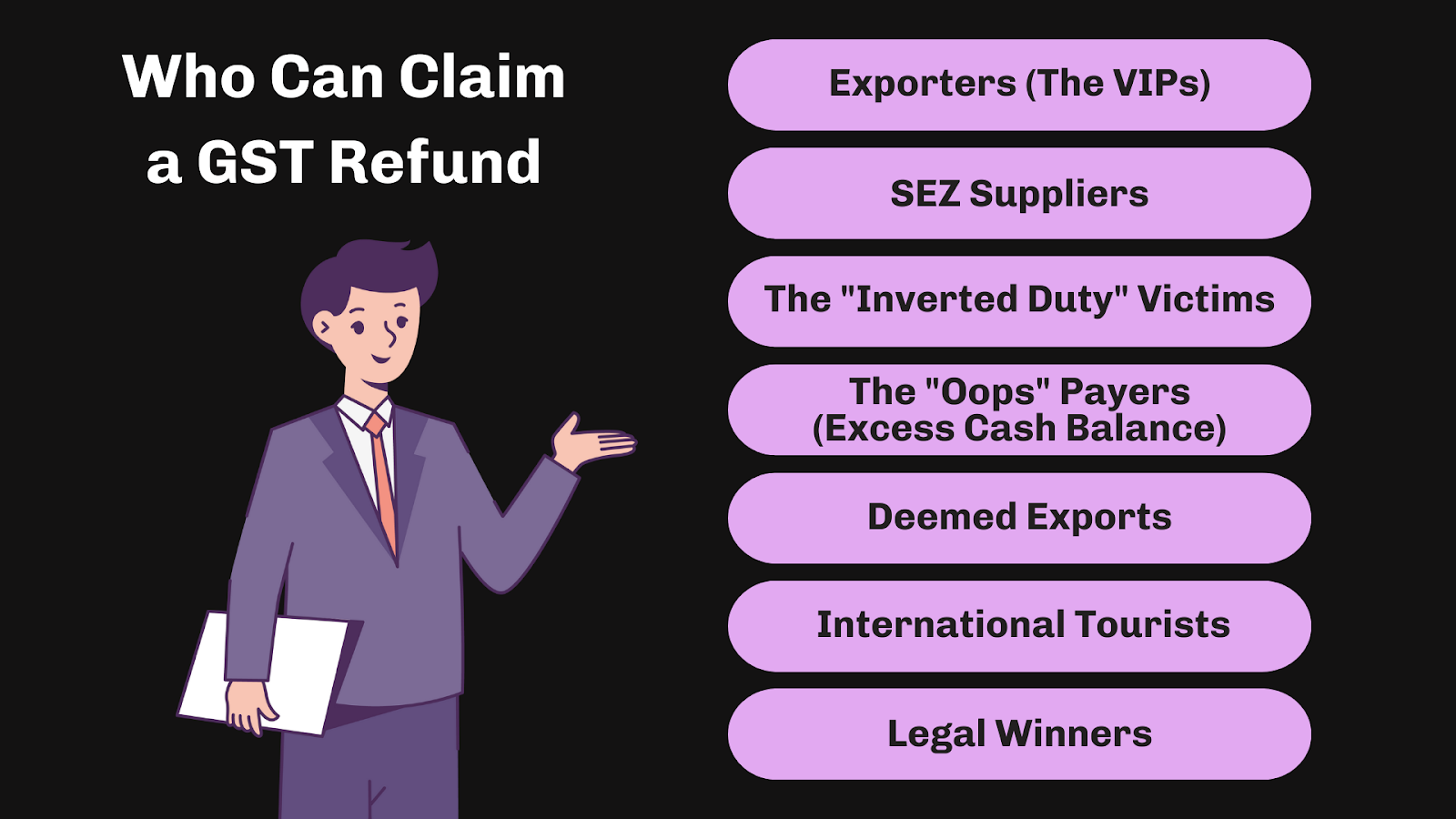
1. Exporters (The VIPs): If you supply goods or services outside India (Zero-rated supplies) under a Letter of Undertaking (LUT) without paying IGST, you can claim a refund on your unutilized Input Tax Credit (ITC).
2. SEZ Suppliers: Selling to Special Economic Zones (Units or Developers)? Congratulations, that counts as a zero-rated supply too. You are eligible.
3. The "Inverted Duty" Victims: This happens when the tax rate on your inputs (purchases) is higher than the tax rate on your outputs (sales). You end up paying more tax on raw materials than you collect on finished goods, leaving you with accumulated credit.
4. The "Oops" Payers (Excess Cash Balance): Did you accidentally deposit ₹10,000 instead of ₹1,000 in your Electronic Cash Ledger? It happens to the best of us. You can claim that excess balance back.
5. Deemed Exports: Specific supplies notified by the government where the refund can be claimed by either the supplier or the recipient.
6. International Tourists: If you are visiting India and buy goods to take back home, you might be eligible for a tax refund on those items upon exit.
7. Legal Winners: If an appellate authority or court passes a judgment in your favour that results in a refund, you are entitled to claim it.
Real-Life Example: The "Inverted" Problem
Meet Rohan, who manufactures school bags. He buys raw zippers and fabric paying 18% GST, but the government has fixed the GST rate on finished school bags at just 12%.
Rohan is constantly paying more tax to buy materials than he collects from selling bags. This creates an Inverted Duty Structure. Instead of letting that extra credit rot in his ledger, Rohan can (and should) file for a refund to get that cash back into his business.
Important Time Limits You Must Know
In the world of tax, procrastination isn't just a bad habit, it’s expensive. You might have a legitimate claim, but if you snooze, you lose.
The General Rule is simple: You must file your refund application within 2 years from the "Relevant Date."
Now, here is the catch. The "Relevant Date" isn't always today. It changes depending on why you are claiming the refund. It’s a bit like a game of Snakes and Ladders where the starting point keeps moving.
Here is a quick cheat sheet to help you calculate your deadline:
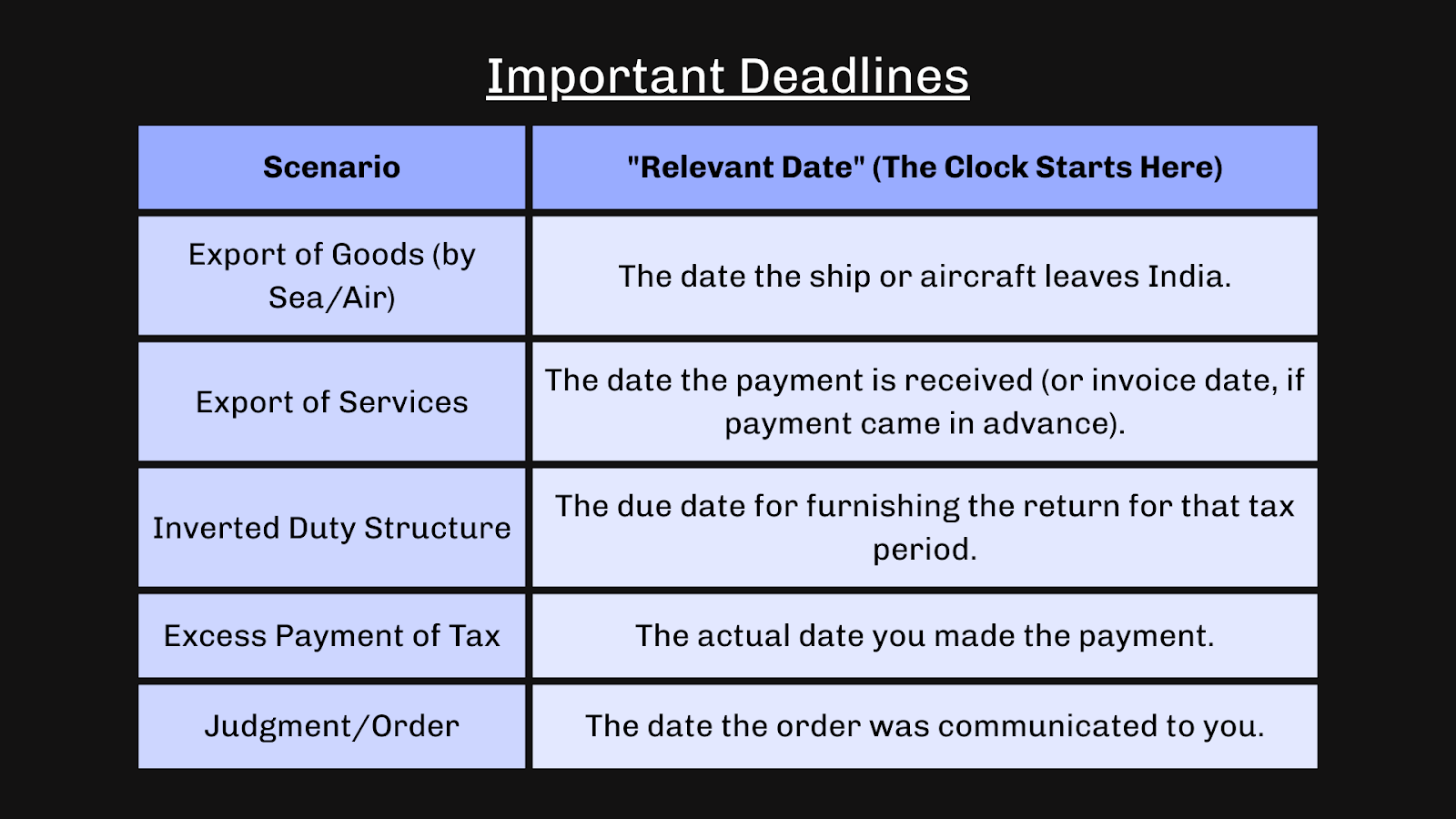
Pro Tip: Don't wait until the 23rd month to start gathering documents. If the portal glitches on the last day, the officer won't accept "Internet issues" as an excuse!
Documents Required Before You Apply
You wouldn't show up to the airport without your passport, right? The GST portal is just as strict, but with less comfortable seating. Before you even click "Login," you need to have your digital paperwork stack ready.
If you go in unprepared, you’ll just end up staring at a "Session Expired" screen. Here is your survival checklist:

1. Form RFD-01: This isn't an attachment, but it’s the main event, the online application form you’ll be filling out on the portal.
2. The "Proof" (Invoices & Bills): Have your relevant tax invoices handy. If you export goods, you need your Shipping Bills or Bills of Export. The officer wants to see exactly what left the building.
3. Bank Details (Crucial!): A copy of a cancelled cheque or passbook.
Note: Your bank account must be validated with PFMS (Public Financial Management System). If your name in the bank account doesn't match your GST registration exactly, the system will reject the transfer.
4. BRC / FIRC (For Service Exporters):
Freelancer Alert: If you are like "Sarah the Graphic Designer" exporting services to the US, you need a Bank Realisation Certificate (BRC) or Foreign Inward Remittance Certificate (FIRC). This proves the dollars actually hit your account.
5. Statement of Invoices: You can’t just upload PDFs of 500 invoices. You need to upload a specific statement (usually in JSON format) summarizing the invoices relevant to the refund.
6. Undertaking & Declaration: A digital "pinky promise" stating that you haven’t been prosecuted for tax evasion and that you haven’t passed on the tax burden to anyone else (this prevents "unjust enrichment").
Step-by-Step Process: How to File GST Refund (Form RFD-01)
Okay, you have your coffee, your documents, and your patience. It’s time to enter the belly of the beast: the GST Portal. Don't worry, we’ll hold your hand through it.
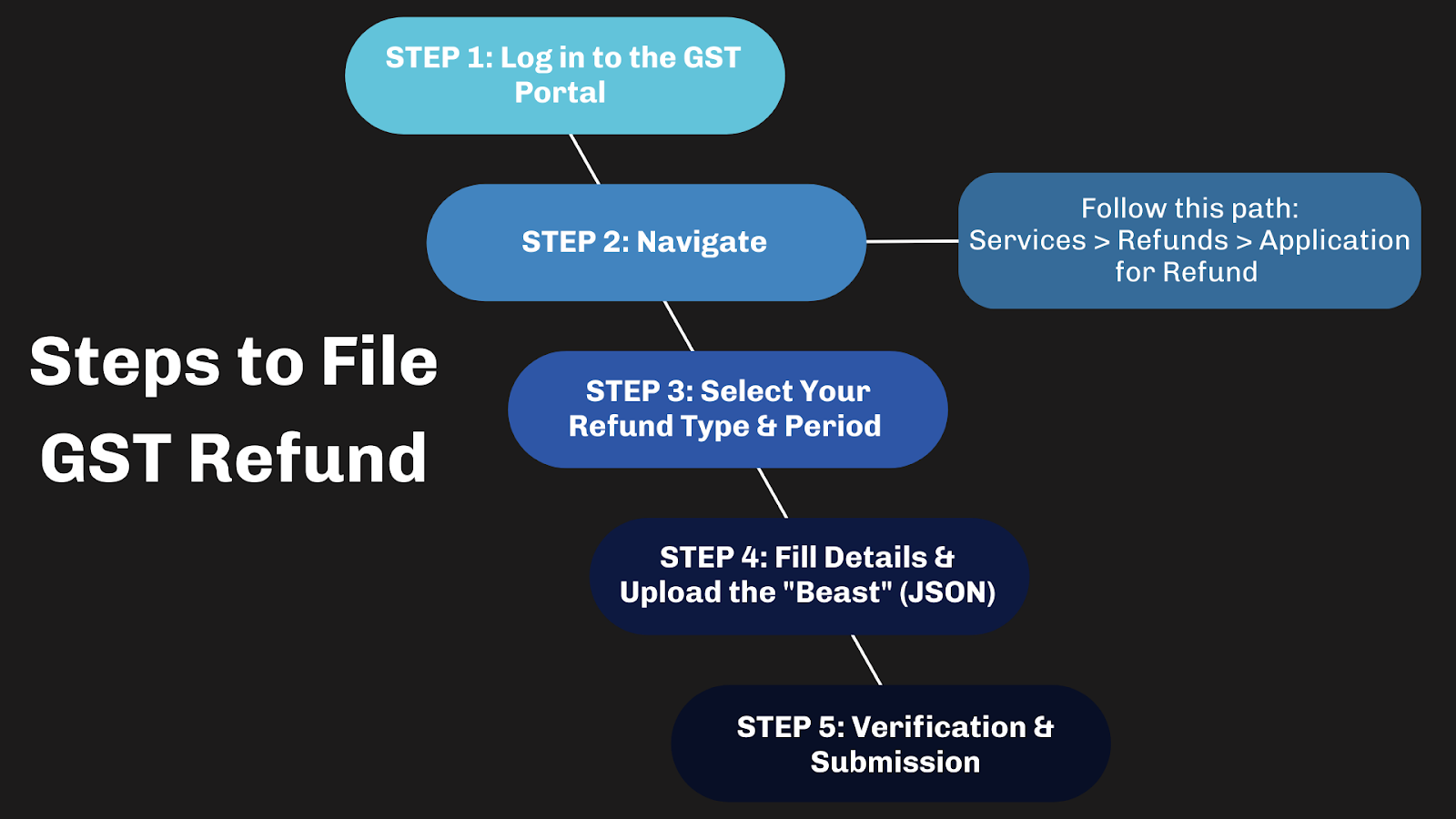
Step 1: Login and Navigate
First, log in to the GST Portal (try to remember your password on the first try, we believe in you!).
Once you're in, follow this path:
Services > Refunds > Application for Refund.
It’s hidden in the menu like a secret level in a video game.
Step 2: Select Your Refund Type & Period
You will see a list of refund categories. This is the most critical step.
- Do not guess. If you are an exporter, choose "Refund of ITC on Export of Goods/Services."
- If you choose the wrong category (like clicking "Any Other" just because it looks easy), your application will be rejected faster than you can say "GST."
- Select the Financial Year and Month for which you want to claim the money.
Step 3: Fill Details & Upload the "Beast" (JSON)
Now, the heavy lifting.
- Statement of Invoices: You usually need to download the offline utility tool, fill in your invoice details, generate a JSON file, and upload it back to the portal. It sounds technical, but it’s basically just Excel with a fancy name.
- Supporting Docs: Upload your BRCs, cancelled cheques, and other proofs here.
- The 5MB Rule: The portal has a strict diet. It won't accept any file larger than 5MB. If your PDF is huge, compress it before you try to upload it, or the system will throw an error.
Step 4: Verification & Submission
Almost there!
- Check the box that says "I hereby declare..." (the legal fine print).
- Submit the application using either DSC (Digital Signature Certificate) or EVC (Electronic Verification Code - essentially an OTP to your phone).
- The Golden Ticket: Once you submit, the system generates an ARN (Application Reference Number). Write this down, screenshot it, or tattoo it (okay, maybe not that). You will need this number to track your money.
What Happens After You Apply? (The Approval Lifecycle)
So, you’ve submitted the application. Now what? Do you sit by the window and wait for a carrier pigeon?
Not quite. The GST system follows a strict timeline. Here is the journey your application takes through the "Alphabet Soup" of forms:
1. ARN Generation (The Receipt):
As soon as you submit, you get an ARN (Application Reference Number). This is immediate. It’s proof you actually did the work.
2. The Fork in the Road (Day 1-15):
The Good News (Form RFD-02): If your application is perfect, the officer issues an Acknowledgment (RFD-02) within 15 days. This means your application has officially been accepted for processing.
The Bad News (Form RFD-03): If the officer finds errors or missing docs, they will issue a Deficiency Memo (RFD-03).
Crucial Note: You cannot "edit" your application after a Deficiency Memo. It’s a hard reset. You have to fix the errors and file a fresh application (new ARN). It’s like failing a driving test and you have to book a new slot.
3. The "Fast Cash" (Form RFD-04):
For Exporters Only: The government understands you need cash flow. So, once the Acknowledgment is issued, they grant a Provisional Refund of 90% of your claim using Form RFD-04. This usually happens within 7 days of the acknowledgment. Think of it as an appetizer before the main course.
4. The Final Verdict (Form RFD-06):
The officer will verify everything in detail. Within 60 days of receiving your complete application, they must issue the Final Sanction Order (RFD-06). They will either approve the full amount, partial amount, or (heaven forbid) reject it.
5. Show Me The Money (Form RFD-05):
Once the sanction order is passed, the officer issues the Payment Order (RFD-05). This is the magic button that sends the funds directly to your validated bank account.
Common Mistakes to Avoid (Filing Buddy Tips)
Experience is the best teacher, but it’s cheaper to learn from someone else’s mistakes. At Filing Buddy, we’ve seen perfectly good refund applications get rejected for the silliest reasons.
Don't let your application become a statistic. Here is how to keep your claim safe:
Filing Buddy Pro-Tips: The "Don't Do This" List
1. The "Lazy Click" Error (Wrong Category):
Never, ever select "Any Other" just because you can't find your category immediately. It might look like a convenient catch-all, but to a tax officer, it looks like "I don't know what I'm doing." This is the fastest way to get a rejection.
2. The Bank Account Blunder:
You might have a valid refund order, but the money won't move if your bank account isn't validated on the portal. If your GST registration name is "Rohan Enterprises" but your bank account says "Rohan Gupta," the system will freeze the transfer. Ensure your PAN and names match perfectly.
3. The Great Data Mismatch:
Your GSTR-1, GSTR-3B, and Shipping Bills need to sing in harmony. If GSTR-1 says you exported ₹1 Lakh and GSTR-3B says ₹90,000, the system will flag it. Reconcile your data before you apply.
4. The "Time Traveler" Mistake:
Remember the 2-year rule? Many people calculate it from the wrong date (e.g., from the end of the financial year instead of the "Relevant Date"). Don't guess. Check the table we provided above!
Conclusion
Navigating the GST portal can sometimes feel like trying to solve a Rubik’s cube blindfolded. But remember, that unclaimed refund isn't just a number on a screen—it’s your hard-earned working capital.
Every day that money sits in the government’s ledger is a day it’s not working for you. Whether it’s buying new inventory, paying your team, or just keeping the lights on, accurate filing is the key to unlocking that cash flow. Don't let a minor typo or a missed deadline stand between you and your money.
Confused by the paperwork? Let 'Filing Buddy' handle your GST refund application while you focus on growing your business.
FAQs
General & Eligibility
1. What is the time limit to claim a GST refund?
You must file a GST refund claim within 2 years from the "relevant date." The relevant date varies by category (e.g., for goods exported by sea, it is the date the ship leaves India).
2. What is the minimum amount required to claim a GST refund?
The minimum refund amount must be ₹1,000 per tax head (IGST, CGST, SGST). If your claim is below this threshold, the application cannot be filed.
3. Who is eligible to claim a refund under the Inverted Duty Structure?
Businesses are eligible if the tax rate on their inputs (purchases) is higher than the tax rate on their outputs (sales), resulting in accumulated Input Tax Credit (ITC). This is common in industries like textiles and footwear.
4. Can I claim a GST refund for an excess balance in my cash ledger?
Yes. If you have deposited excess cash into your Electronic Cash Ledger by mistake or overestimation, you can claim a refund for that balance anytime using Form RFD-01.
5. Is a physical submission of documents required for a GST refund?
No. The entire GST refund process is online through the GST Portal. You do not need to submit physical documents to the jurisdictional office unless explicitly requested during a specific verification.
Process & Forms
6. Which form is used to file a GST refund application?
The primary form for claiming a GST refund is Form GST RFD-01. It is filed online via the GST Portal under Services > Refunds > Application for Refund.
7. What is the maximum file size for uploading documents in a GST refund?
The GST portal allows a maximum file size of 5 MB per document. Files must be in PDF format, and you can upload up to 4 supporting documents with your application.
8. What is Form RFD-03 (Deficiency Memo)?
Form GST RFD-03 is a "Deficiency Memo" issued by the tax officer if your application is incomplete or has errors. If you receive this, you cannot correct the old application; you must file a fresh application with a new ARN.
9. What is a Provisional Refund (RFD-04)?
A Provisional Refund is a fast-track mechanism for exporters, allowing them to receive 90% of their claimed amount within 7 days of acknowledgment (RFD-02), before the final verification is complete.
10. How long does it take to get a GST refund credited?
The government is mandated to sanction the refund within 60 days of receiving a complete application. If approved, the amount is credited directly to your validated bank account via Form RFD-05.
Troubleshooting & Status
11. Why was my GST refund rejected?
Common reasons include: selecting the wrong refund category, mismatches between GSTR-1 and GSTR-3B, failure to validate the bank account, or missing proof of export (like Shipping Bills or BRCs).
12. Does the government pay interest on delayed GST refunds?
Yes. If the refund is not sanctioned within 60 days from the date of receipt of the application, the government is liable to pay interest at 6% per annum for the period of delay.
13. What documents are needed for a Service Export refund?
Apart from invoices, service exporters must provide a Bank Realisation Certificate (BRC) or Foreign Inward Remittance Certificate (FIRC) to prove that payment was received in convertible foreign exchange.
14. How can I track my GST refund status?
You can track the status on the GST Portal by navigating to Services > Refunds > Track Application Status and entering your ARN (Application Reference Number).
15. Can I edit my GST refund application after submitting it?
No. Once Form RFD-01 is submitted and an ARN is generated, you cannot edit it. If you made a mistake, you must wait for the officer to issue a rejection or deficiency memo, and then file a fresh application.
Contact Us
An expert will call you within 24 hours. No payment required to get started.
Related Post
How should a start-up complete ITR filing
Business entities must file their ITR annually to comply with the tax laws of their respective countries. It helps the government assess and collect the appropriate amount of income tax from taxpayers and ensures proper accountability of financial activities.
. 3 Mins.png)
5 step checklist for GST compliance in Indian Startups
Learn about how GST works. The basics of GST along with its compliances. Uncover what your business needs to keep in mind concerning GST rules and GST compliance.
. 3 min read.png)
₹20 Lakhs and Beyond: Understanding GST for Freelancers in India
Are you a freelancer or aspiring to be one? In this blog, uncover the basics of freelancing and requirements involving GST. Learn about all the exemptions, obligations, and compliances of GST for freelancers in india.
. 5 min read