
DIR-3 KYC Filing Process Explained | Avoid Errors & Penalties
Introduction
If Part 1 explained why DIR-3 KYC matters, Part 2 answers the question every director eventually asks:
“Alright, I get it. But how do I file this without something going wrong?”
DIR-3 KYC isn’t complicated. What makes it stressful is the MCA portal, OTP failures, rejected forms, and last-minute surprises caused by small oversights.
This guide shifts the focus from awareness to action. We’ll walk through what to prepare, how to file correctly, how long it actually takes, and how to handle common errors, so DIR-3 KYC becomes a predictable, low-stress compliance under the new 3-year MCA framework.
Step-by-Step Checklist Before You File DIR-3 KYC
Before you open the MCA portal, it’s worth spending a few minutes getting your basics in place. Most DIR-3 KYC rejections don’t happen during filing, they happen because something small wasn’t ready beforehand. This checklist helps you avoid exactly that.
1. Confirm Your DIN Status
Start by checking whether your DIN is currently active. Directors often assume everything is fine until a form gets rejected.
Make sure:
- Your DIN status shows “Active” on the MCA portal
- You are within your applicable DIR-3 KYC filing cycle
- You are not filing prematurely or after the due cycle
If the DIN already shows as deactivated due to non-filing, you’ll still be able to file, but the ₹5,000 late fee will apply.
2. Verify Your Personal Contact Details
DIR-3 KYC relies heavily on OTP verification. If your contact details aren’t accessible to you personally, the filing will fail midway.
Check that:
- The email ID is personal and currently in use
- The mobile number is active and in your possession
- You can receive OTPs instantly on both
Avoid using office emails or assistants’ phone numbers. OTP delays are one of the most common reasons filings get stuck.
3. Review Whether Your Details Have Changed Since Last Year
This step determines how you’ll file DIR-3 KYC.
Ask yourself:
- Has your address changed?
- Have you updated your email ID or mobile number?
- Has there been any correction to your name or date of birth?
If nothing has changed, you can use DIR-3 KYC (Web).
If even one detail has changed, you must file e-Form DIR-3 KYC.
Choosing the wrong mode leads to rejection or incorrect MCA records.
4. Ensure Your DSC Is Valid (If Required)
If you need to file e-Form DIR-3 KYC, a valid Digital Signature Certificate (DSC) is mandatory.
Before filing, confirm:
- The DSC is not expired
- It is registered on the MCA portal
- The DSC belongs to you, not another director or professional
DSC issues usually surface at the final submission stage, when time pressure is highest.
5. Keep Your Official Documents Handy
Even though DIR-3 KYC doesn’t always require document uploads, having accurate references prevents mismatches.
Keep ready:
- PAN (for Indian directors)
- Passport (for foreign directors)
- Address details as per official records
Your entered information must exactly match these records to avoid verification issues.
6. Plan Your Filing Date Realistically
Under the revised MCA framework, DIR-3 KYC is not an annual form.
Smart planning means:
- Tracking when your DIR-3 KYC is due within the 3-year cycle
- Filing early within that cycle
- Avoiding last-minute filings just before the MCA deadline window closes
A calm filing experience almost always starts with knowing your cycle, not guessing dates.
Why This Checklist Matters
Directors who run into DIR-3 KYC problems usually don’t fail because the process is complex. They fail because one small prerequisite was missed.
Five minutes spent on this checklist can save:
- Rejected filings
- ₹5,000 penalties
- Blocked company compliances
- Unnecessary follow-ups
Once this checklist is complete, the actual DIR-3 KYC filing process becomes straightforward.
In the next section, we’ll walk through the DIR-3 KYC filing process step by step, so you can submit it confidently without second-guessing each screen.
DIR-3 KYC Filing Process (Step-by-Step)
Once your checklist is in place, the actual DIR-3 KYC filing is fairly structured. The MCA portal follows a fixed flow, and knowing what comes next removes most of the anxiety directors feel while filing.
Step 1: Identify the Correct Filing Mode (Web vs e-Form)
Before logging in, the most important decision is choosing how you’ll file DIR-3 KYC. The MCA provides two modes, and using the wrong one is a common reason for rejection.
You should first check whether any personal details have changed since your last filing.
DIR-3 KYC (Web) applies if:
- Your personal details are unchanged
- You are filing periodic re-verification as per MCA cycle
e-Form DIR-3 KYC applies if:
- Your personal details has changed
- You need to update MCA records
- DSC authentication is required
If there’s even a small change in details, the e-Form is mandatory.
Step 2: Access the MCA V3 Portal
Start by visiting the MCA V3 portal and logging in with your credentials.
- If you’re a first-time user, complete the MCA registration first
- Existing users can log in directly
- Keep your DIN, registered email ID, and mobile number accessible
DIR-3 KYC filing always begins from the MCA portal, there is no offline alternative.
Step 3: Navigate to DIR-3 KYC Web
Once logged in, follow the portal navigation carefully:
- Go to MCA Services
- Select Company e-Filing
- Click on DIN Related Filings
- Choose DIR-3 KYC (Web)
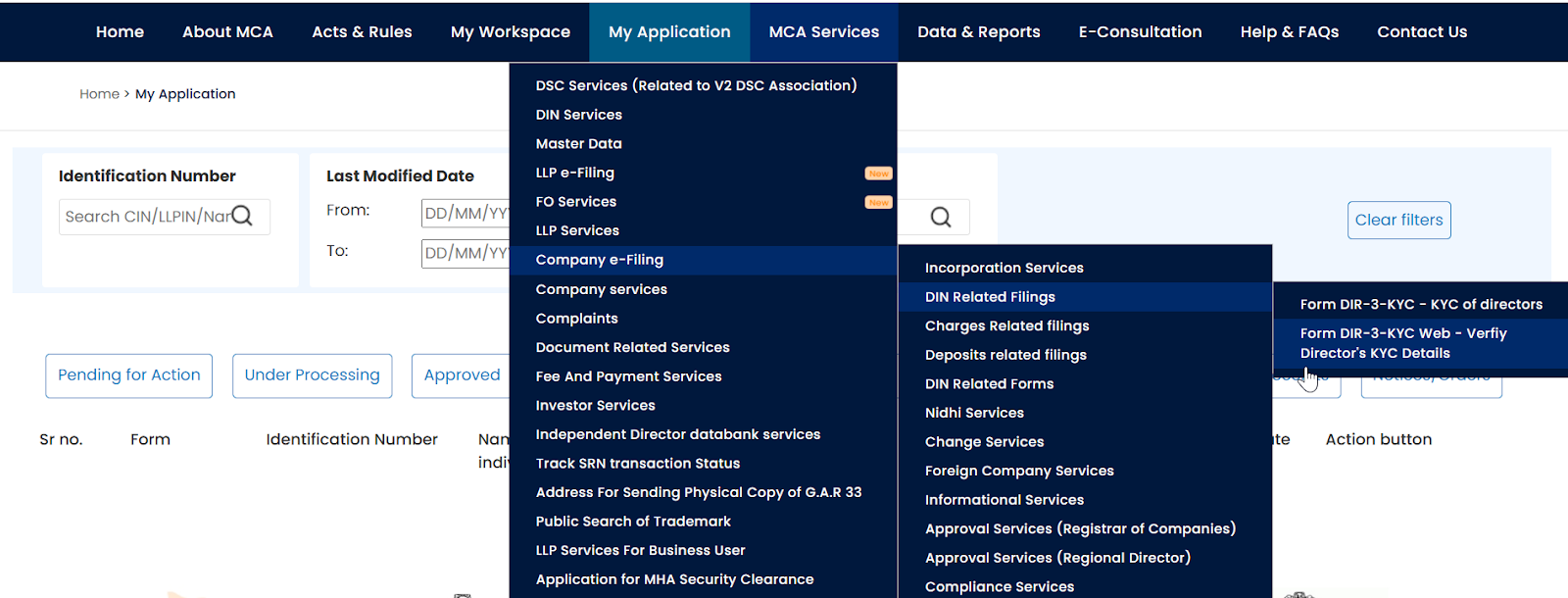
This option appears only if your personal details haven’t changed since the previous year.
Step 4: Enter DIN and Trigger OTP Verification
You’ll now be asked to enter your Director Identification Number (DIN).
After this:
- The portal displays your registered mobile number and email ID
- OTPs are sent to both
- Enter and verify each OTP within the given time window
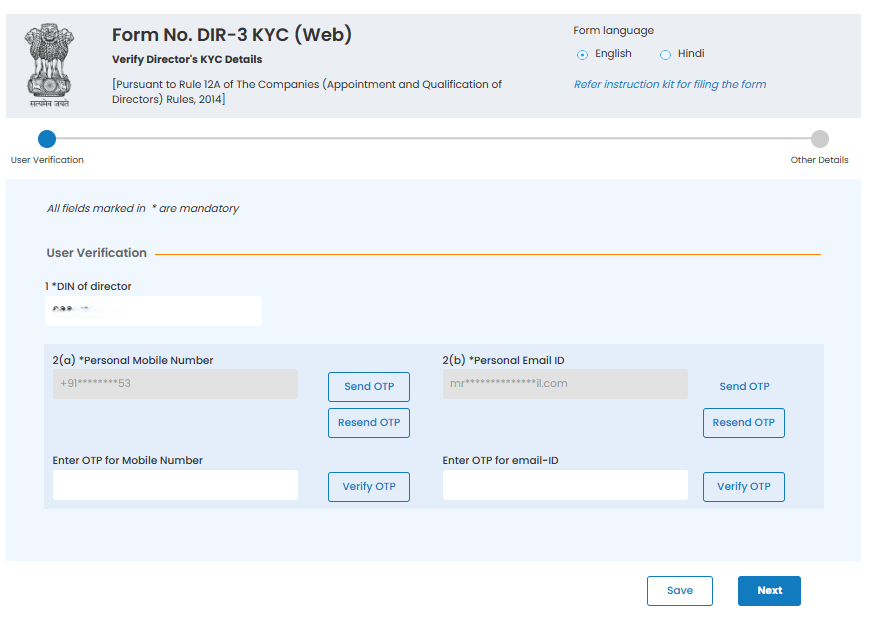
OTP verification is mandatory. If either OTP fails, the session may expire and require restarting.
Step 5: Review Personal Details
The system auto-fetches your existing DIN records.
At this stage:
- Carefully review name, date of birth, and address
- These fields cannot be edited in the web version
- If anything is incorrect, you must switch to e-Form DIR-3 KYC
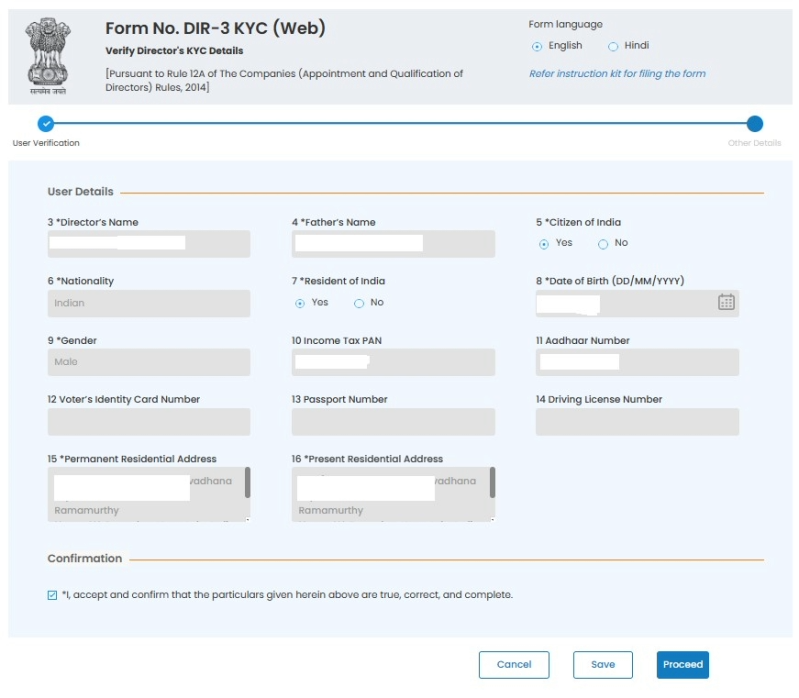
If all details are accurate, accept the declaration and proceed.
Step 6: Submit the DIR-3 KYC Web Form
Once verified, submit the form through the confirmation prompt.
- No document upload is required at this stage
- The submission confirms periodic verification of your DIN
- The portal processes the request immediately
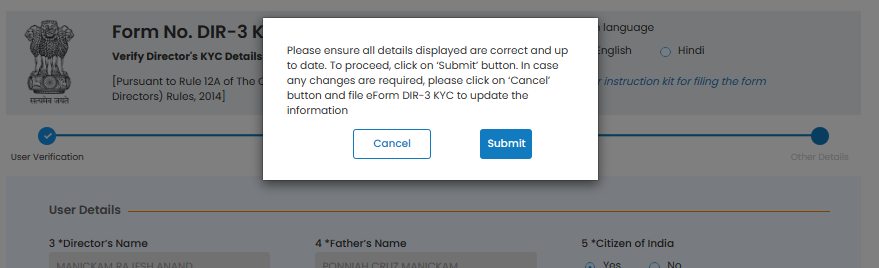
This step completes the filing action on your end.
Step 7: Service Request Number (SRN) Generation
After successful submission, the system generates a Service Request Number (SRN).
- The SRN acts as proof of submission
- It is used for tracking or future communication with MCA
- Save or note this number for reference
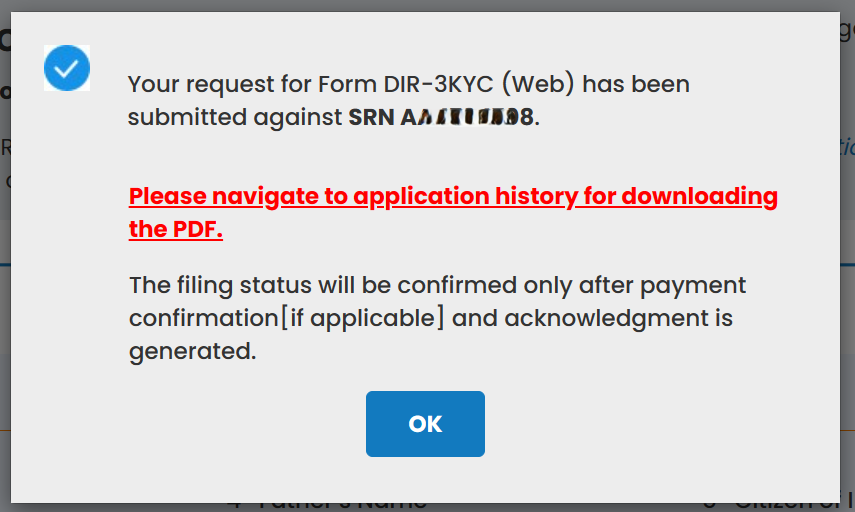
Even if no fee applies, SRN generation confirms the process has moved forward.
Step 8: Fee Confirmation (If Applicable)
Fee applicability depends on your DIN status:
- If your DIN is active, no fee is payable, you only need to confirm the submission to complete the process.
- If your DIN has been deactivated due to non-filing of DIR-3 KYC, a fixed late fee of ₹5,000 must be paid for the DIN to be reactivated.
- Click Confirm Submission
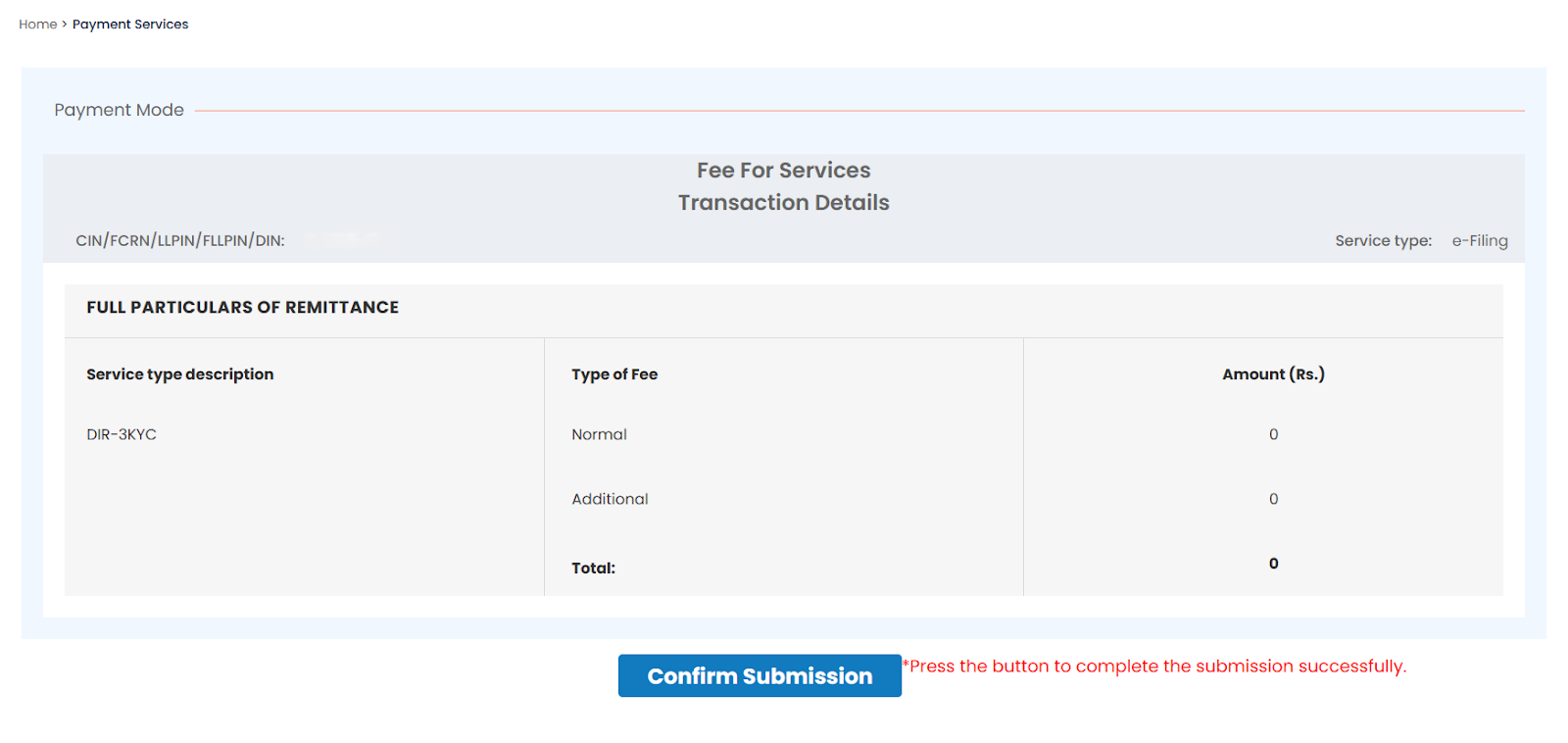
Skipping this step leaves the filing incomplete.
Step 9: Acknowledgement & Completion
Once all steps are completed:
- The MCA portal generates an acknowledgement
- Your DIN status reflects as compliant/active
- No further approval or follow-up is required
Saving the acknowledgement is recommended for future reference.
DIR-3 KYC Filing Timeline Reminder
DIR-3 KYC is no longer an annual ritual, but timing still matters.
What determines compliance today is:
- Whether your DIR-3 KYC cycle is due
- Whether you file within that prescribed window
- Whether you avoid filing during peak portal traffic
Most compliance issues don’t arise because directors didn’t know how to file—but because they didn’t know when they were required to file. Tracking your cycle is now more important than tracking calendar deadlines.
Who This Process Applies To
This step-by-step filing applies to:
- Active directors
- Non-executive and independent directors
- Directors associated with multiple companies or LLPs
- DIN holders not currently on any board
If you hold a DIN, this process applies to you, once every 3 years.
In the next section, we’ll set realistic expectations around how long the DIR-3 KYC filing actually takes, so you can plan it without stress or guesswork.
How Long Does DIR-3 KYC Filing Take? (What to Expect)
One of the biggest reasons directors postpone DIR-3 KYC is uncertainty around time. The good news is that, in most cases, the filing itself is quick. What takes time is usually preparation gaps or last-minute issues, not the process.
Typical Time Required (When Everything Is in Order)
For directors whose details haven’t changed since last year, DIR-3 KYC is designed to be fast.
- DIR-3 KYC (Web):
Usually completed within 10–15 minutes, including OTP verification. - e-Form DIR-3 KYC:
It takes 20–30 minutes if the DSC is active and details are ready.
In both cases, the actual submission happens in a single sitting. There’s no back-and-forth if inputs are correct.
What Can Make It Take Longer
Most delays are not technical, they’re situational. Filing time stretches when:
- OTPs don’t arrive due to outdated email or mobile numbers
- DSC is expired, unregistered, or not accessible
- Personal details don’t match MCA records
- The filing is attempted close to the deadline when portal traffic is high
When any of these happen, a “15-minute task” can spill into days.
Realistic Expectation vs. Reality
A common pattern looks like this:
A director logs in expecting to finish quickly, realises the email on record is no longer accessible, pauses the filing, and comes back later. By then, the deadline is closer, stress increases, and small fixes feel bigger than they are.
The filing didn’t take long, the interruptions did.
When to File to Keep It Smooth
The best way to control time is timing.
- File early in your DIR-3 KYC cycle
- Avoid filing near the end of the MCA window
- Treat DIR-3 KYC as a scheduled compliance milestone, not an emergency task
When filed early, DIR-3 KYC is predictable, quick, and uneventful, which is exactly how compliance should feel.
In most cases, DIR-3 KYC doesn’t take long because the process is complicated. It takes longer when something doesn’t go through as expected. OTP issues, portal validations, or minor mismatches are what usually cause delays.
In the next section, we’ll look at the most common DIR-3 KYC errors on the MCA portal and how to fix them efficiently.
How to Fix Common DIR-3 KYC Errors on the MCA Portal
Most DIR-3 KYC filings don’t fail because directors do something wrong. They fail because the MCA portal is strict about validations. Knowing why an error occurs makes fixing it straightforward and prevents repeated attempts.
Below are the most common DIR-3 KYC issues directors face and how to resolve them calmly and correctly.
1. OTP Not Received on Email or Mobile
OTP-related errors are the most frequent cause of stalled filings, especially for web-based DIR-3 KYC.
This usually happens when:
- The email ID or mobile number entered does not match MCA records
- Corporate emails block automated OTPs
- Network delays occur during peak filing periods
How to fix it:
- Recheck the exact email ID and mobile number last used for DIR-3 KYC
- Avoid using office emails with strict firewalls
- Retry after a short interval instead of repeated clicks
If OTPs consistently fail, switching to e-Form DIR-3 KYC may be necessary.
2. Web-Based Filing Option Disabled
Many directors get confused when DIR-3 KYC (Web) is unavailable on the portal.
This typically means:
- Personal details were changed since last year
- MCA requires verification through DSC
- The DIN was previously deactivated
How to fix it:
- Use e-Form DIR-3 KYC instead of the web version
- Ensure your Digital Signature Certificate (DSC) is active and registered
- Complete filing before attempting any other DIN-related action
The web option is only for unchanged details.
3. DSC Errors During e-Form Submission
DSC-related issues often appear at the final submission stage.
Common DSC problems include:
- Expired DSC
- DSC not registered on the MCA portal
- Browser incompatibility
How to fix it:
- Check DSC validity before starting the filing
- Register the DSC on the MCA portal in advance
- Use a compatible browser and updated Java utility
Testing the DSC beforehand saves last-minute stress.
4. Personal Detail Mismatch (Name, DOB, Address)
Even minor mismatches can cause rejection.
This happens when:
- Name format differs from PAN or passport
- Address was updated elsewhere but not in MCA records
- DOB entered doesn’t match DIN database
How to fix it:
- Ensure consistency with PAN/passport details
- Update details using e-Form DIR-3 KYC if required
- Avoid abbreviations or informal name variations
Accuracy matters more than speed here.
5. DIN Showing as Deactivated
Some directors discover the issue only after seeing this status.
This occurs when:
- DIR-3 KYC was not filed by the deadline
- The DIN was previously marked inactive due to non-compliance
How to fix it:
- File DIR-3 KYC with the applicable late fee
- Wait for MCA to update the DIN status to “Active”
- Resume pending filings only after confirmation
There’s no workaround, reactivation requires proper filing.
Why Ignoring Errors Can Escalate
Non-compliance with DIR-3 KYC doesn’t always create immediate problems—but it leaves a permanent trail.
For instance, Mr. Pankaj Kumar, director of Shiva Golden Nidhi Limited, faced a ₹50,000 penalty due to repeated non-compliance. What started as a missed filing later surfaced during regulatory scrutiny.
DIN history doesn’t reset automatically. It can resurface during:
- Due diligence for investments or funding
- Regulatory inspections
- Directorship appointments in new companies
Ignoring small errors today often creates bigger explanations tomorrow.
When to Seek Professional Help
If errors repeat even after correct inputs, it’s usually not a user mistake. In most cases, it’s a system-level issue or a mismatch in MCA records that needs careful handling.
You should consider expert support when:
- OTP failures persist despite multiple attempts
- DSC errors continue even with a valid and registered certificate
- DIN remains inactive after successful DIR-3 KYC filing
This is where Filing Buddy helps. Our team reviews your DIN status, verifies portal-level issues, and ensures your DIR-3 KYC is completed correctly, without trial-and-error or unnecessary delays.
Sometimes, a quick professional check saves hours of frustration and prevents repeat penalties.
Key takeaway:
DIR-3 KYC errors are common, predictable, and fixable. The MCA portal follows strict rules, and once you understand them, filing becomes routine rather than frustrating.
In the next section, we’ll look at what happens after you submit DIR-3 KYC, how to track status, what “approved” really means, and when follow-up is actually required.
What Happens After You File: Status & Verification
Once you submit your DIR-3 KYC, many directors wonder: “Did it go through? How do I know my DIN is active?” Understanding the post-filing process is crucial to avoid surprises.
Checking Your DIR-3 KYC Status
After submission, the MCA portal updates your DIN status automatically. Here’s what to expect:
- Pending: The system is verifying your submission and sending OTPs if required.
- Active: Your DIR-3 KYC is accepted, and your DIN remains fully usable.
- Rejected: Some details didn’t match MCA records, or there were portal errors. Re-submission is necessary.
Typically, status updates happen within a few hours to a couple of days after submission. Rarely, it may take longer if system queues are high or if DSC/OTP mismatches occur.
Where to Check Status
- Log in to the MCA portal using your DIN credentials.
- Navigate to Director Services → DIR-3 KYC → View Status.
- You’ll see a clear status message next to each DIN you hold.
Common Post-Filing Scenarios
- Silence after submission: This is normal; the portal may take time to update.
- OTP or verification delays: Retry carefully or seek professional review if repeated.
- DIN remains inactive: Usually indicates submission errors, mismatched details, or pending approval by MCA.
Quick Tip: Avoid Follow-Up Panic
Many directors assume silence means something went wrong. In most cases, it doesn’t.
The MCA system processes filings in batches. A single status check after 24-48 hours is usually enough. If your DIN hasn’t updated even after that, it’s time to review the submission, not refresh the page every hour.
Can Foreign Directors File DIR‑3 KYC?
If you’re a director living outside India, DIR‑3 KYC can seem tricky, but it’s actually manageable once you understand the requirements. MCA treats foreign directors the same as Indian directors when it comes to compliance, but there are a few extra details to keep in mind.
Key Requirements for Foreign Directors
- Mandatory Filing: All foreign nationals holding a DIN must complete DIR-3 KYC once every three years, as per the MCA cycle.
- Digital Signature: A Class 3 DSC is required for authentication on the MCA portal.
- Document Authentication: Official documents, including passport and proof of address, must be notarized and apostilled (or consularized if outside Hague Convention countries).
- Proof of Identity: A passport copy is mandatory.
- Proof of Address: Bank statements, utility bills, or driving licenses are accepted, provided they are appropriately notarized/apostilled.
- Filing Portal: Submission is through the MCA V3 Portal.
Common Pitfalls for Foreign Directors
- Using an Indian phone/email not linked to your DIN → OTP failures.
- Assuming the web version is always sufficient → If your details changed, you must use the e‑Form with DSC.
- Waiting for the company secretary to file → DIR‑3 KYC is personal; missing it deactivates your DIN.
Practical Example
Maria Fernandes, a director based in Dubai for a start-up in Mumbai, missed her first DIR‑3 KYC because she tried using her Indian office email. The OTP never reached her, and her DIN was deactivated. Once she switched to her personal international email and filed via e‑Form with DSC, her DIN was reactivated, and all pending filings went through smoothly.
Smart Tip for Foreign Directors
- Keep a dedicated email and phone number for MCA compliance.
- Check the portal status after 24–48 hours to ensure the filing is accepted.
- If repeated OTP or DSC issues occur, consider a trusted compliance partner like Filing Buddy to guide you.
What If You Have Multiple DINs: How to Handle DIR‑3 KYC
Ideally, every director should hold only one DIN. MCA rules prohibit multiple active DINs for a single individual. However, in practice, sometimes directors may have old or duplicate DINs that were never surrendered. DIR‑3 KYC needs to be filed for each valid DIN to ensure compliance and prevent deactivation.
Key Guidelines
- Single Valid DIN: Check your MCA records to confirm only one active DIN.
- Surrender Extra DINs: Any additional DINs must be formally surrendered before filing DIR‑3 KYC.
- Verify Status: Only active DINs need DIR‑3 KYC; inactive or surrendered DINs do not.
Smart Tip
- Use the DIN verification tool on the MCA portal before filing.
- Maintain a record of DIN status to avoid accidental non-compliance.
- If in doubt, consult a professional like Filing Buddy to ensure only one DIN is active.
Practical Tips to Stay Compliant
Staying compliant with DIR‑3 KYC doesn’t have to be stressful. With a few smart habits, you can avoid penalties, missed deadlines, and last-minute chaos. Think of it as making compliance a routine part of your professional life, like checking your emails or calendar.
Key Compliance Habits
- Set Calendar Reminders: Track Your DIR-3 KYC Cycle, not just calendar years.
- Verify Contact Details Annually: Make sure your email and mobile linked to your DIN are current for OTP verification.
- Keep a Single Filing Mode: Decide whether you’ll use Web DIR‑3 KYC or e-Form based on whether your details have changed. Stick to it to avoid confusion.
- Track MCA Updates: If extensions are announced, note them, but always plan to file by the original deadline.
- Maintain Records: Save confirmation emails, acknowledgments, and payment receipts to avoid disputes or repeated queries.
- Use Trusted Help Wisely: Occasional professional review (like Filing Buddy) can prevent repeated errors, especially for directors with multiple DINs or complex filing histories.
Small Efforts, Big Impact
Consistency beats last-minute heroics. Directors who integrate these habits:
- Avoid penalties and DIN deactivation
- Keep corporate filings smooth
- Reduce stress and ensure uninterrupted compliance
Conclusion
DIR-3 KYC may seem like just another form, but for directors, it’s a compliance checkpoint that quietly protects your DIN, credibility, and board eligibility.
Here are the three key takeaways under the new MCA framework:
- DIR-3 KYC Is Mandatory, Even If Not Annual
Every DIN holder must comply once every three years, as per the prescribed MCA cycle. Missing it still leads to DIN deactivation and penalties. - Cycle Awareness Is the New Compliance Skill
Knowing when your DIR-3 KYC is due matters more than knowing how to file it. - Non-Compliance Leaves a Permanent Paper Trail
As cases like Mr. Pankaj Kumar’s show, DIN history doesn’t disappear. It resurfaces during audits, due diligence, and regulatory reviews.
Filing DIR‑3 KYC doesn’t have to be daunting. With preparation, awareness, and smart habits, it becomes a simple part of your compliance routine, ensuring your DIN stays active and your director duties remain uninterrupted.
Stay ahead of compliance stress and keep your corporate responsibilities seamless, trust Filing Buddy to guide you through every step of DIR‑3 KYC.
FAQs: DIR‑3 KYC Filing
- What is DIR‑3 KYC?
It is a mandatory compliance requirement where DIN holders periodically verify or update their details with the MCA.
- Who must file DIR‑3 KYC?
All active DIN holders, including foreign directors, must file, regardless of company activity.
- What happens if I miss the DIR‑3 KYC deadline?
A ₹5,000 penalty applies, and your DIN may be deactivated until compliance is completed.
- Can I file DIR‑3 KYC if my DIN is inactive?
Yes, you can reactivate it by submitting DIR‑3 KYC along with the applicable late fee.
- What is the difference between Web DIR‑3 KYC and e‑Form DIR‑3 KYC?
Web DIR‑3 KYC is for unchanged details verified via OTP. e‑Form is required when personal information has changed and requires DSC.
- Do foreign directors need to file DIR‑3 KYC?
Yes, all foreign DIN holders must file DIR-3 KYC every 3 years, using DSC and notarized/apostilled documents.
- What documents do I need for DIR‑3 KYC?
Generally, PAN for Indian directors and passport plus proof of address for foreign directors. Documents must match MCA records.
- How long does DIR‑3 KYC take?
Web filing takes 10–15 minutes, e‑Form filing takes 20–30 minutes if all details and DSC are ready.
- Why is my DIR‑3 KYC rejected?
Common reasons include OTP failures, DSC errors, personal detail mismatches, or using the wrong filing mode.
- Can multiple DINs be filed with one DIR‑3 KYC?
No. Each active DIN requires separate filing. Extra DINs must be surrendered to avoid non-compliance.
- What if my DSC doesn’t work?
Check validity, register it on MCA, and use a compatible browser. Persistent issues may need professional assistance.
- Do I need to file DIR‑3 KYC for an inactive company?
Yes, DIR‑3 KYC is tied to your DIN, not company activity. Inactive directors still need to comply.
- How do I check my DIR‑3 KYC status?
Log in to MCA Portal → Director Services → DIR‑3 KYC → View Status. Status updates usually appear within 24–48 hours.
- Can I rely on MCA deadline extensions?
No. Extensions are no longer central to DIR-3 KYC planning. Filing should be aligned strictly with your applicable cycle.
- When should I seek professional help for DIR‑3 KYC?
If OTPs fail repeatedly, DSC errors persist, or DIN remains inactive despite correct filing, expert support (like Filing Buddy) ensures timely compliance.
Contact Us
An expert will call you within 24 hours. No payment required to get started.
6.png) How to Claim a TDS Refund: Step-by-Step Guide
5 minutes read
How to Claim a TDS Refund: Step-by-Step Guide
5 minutes read
6.png) DIR-3 KYC Compliance: A Director's Guide to Avoiding Disqualification
5 minutes read
DIR-3 KYC Compliance: A Director's Guide to Avoiding Disqualification
5 minutes read
2.png) ITR Filing Last Date September 2026: The Founder's Guide to Tax Audits & Belated Returns
5 minutes read
ITR Filing Last Date September 2026: The Founder's Guide to Tax Audits & Belated Returns
5 minutes read
4.png) Register For ESI & PF Now Or Face Employer Penalties On Every Payroll!
5 minutes read
Register For ESI & PF Now Or Face Employer Penalties On Every Payroll!
5 minutes read
Frequently Asked Questions
Have a question about this?
Our team can walk you through what applies to your business and what to do next.
Talk to our teamRelated posts
How to Obtain a Company Registration Number in India
Understanding Corporate Identification Numbers (CINs) and How to Obtain Them in India
. 2 mins.png)
Difference between Udyog Adhaar and Udyam Certificate
Want to get registered for Udyog Aadhar and Udyam Certificate? Here is their registration processes. Also, know about their differences. Explore their features, benefits, and processes to register online for each, helping you to choose the right option as per your need.
. 3 min read.png)
Changing Your Bank Signatory? Here are the Y Documents Required by Most Banks in India
Learn how bank signatory is important for financial workflow. Know why bank signatories are important and discover the documents required to change signature of your signatory.
. 5 min readEverything right at your mail.
Request a Call Back
Leave your details and Divya from Filing Buddy will call you from +91 788 008 1056.
Prefer to call now? 📞 +91 788 008 1056
Chat with us on WhatsApp
Hi there! 👋 Connect with our team on WhatsApp.
Hello FilingBuddy, I would like to know more about your services.
Chat Now